Before Publishing–Formatting Options

Formatting is getting your manuscript ready for a publisher to go to print. If you are going with a traditional publisher, it is still advisable to format your manuscript, so it is set out like a book, made easy to read to stand out from the slush crowd.

I have outlined the various formatting programs available to try.

Word Formatting

I have used Word to format two novels and a short story for competitions with Romance Writers of Australia.  I found the process was time consuming and you have to be pedantic but I, and many authors use Word to format their books.

Below is a list of requirements that were required for a story in the RWA anthology.

My experience showed that consistency is essential. I have listed the main points.

  1. Have a consistent font and size.
  2. Make sure your computer is set for Australian English or whatever region you choose.
  3. Make sure your quotation marks are consistent. Either all single or all double.
  4. Em dash — and ellipsis … don’t have full stops after them and need to be consistent.
  5. Use italics for inner thoughts throughout.
  6. Either don’t use or use full stops for salutations throughout. Mr. or Mr but not a mix of both.
  7. Have consistent spacing between lines.
  8. Use centred scene breaks. You can use *** or ~*~ but check on the requirements of the publishing platform.
  9. Use one or two spaces between sentences throughout your manuscript.
  10. Use the find and replace function to check on things like spacing at the end of a paragraph or mistakes in your typing. Select the entire manuscript and go to home/replace and type ^p in the find field, then type ^ p in the replace field and click on replace all. It will let you know if there are any changes.
  11. Delete all tab indents. Select the entire manuscript and go to Layout, Paragraph, Tabs and change the default tab stop to 0cm and click on clear all and select OK.
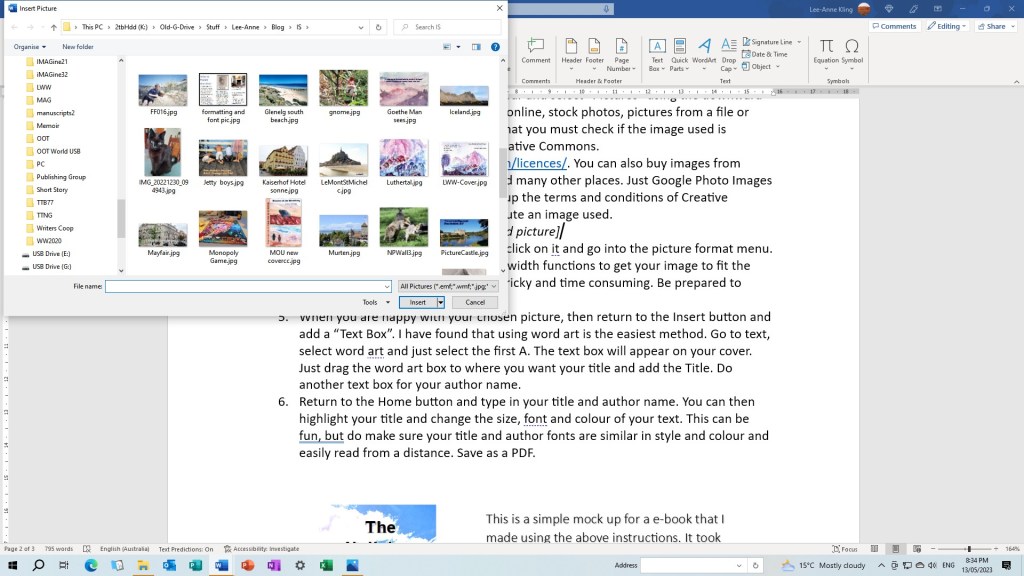
  12. Then indent all paragraphs to a set amount, usually 0.5cm for novels. Do not use tabs or the space bar as this can cause problems with downloading your document.
  13. Check that your line breaks are consistent by highlighting the document and then use the find and replace window. In Find enter ^l (lowercase L) and click on replace all. (^ is found in the functions key on the keyboard)

I found formatting with Word was doable but required time and careful instructions to make it work. There are other options.

Kindle Create

Kindle Direct Publishing provide a free program, Kindle Create to assist indie authors upload to KDP (Amazon). They have a tutorial which allows you to play with Jane Austen’s Pride and Prejudice and learn how to use the program. Download and install the tool and then you can practice. You need a cover to use this program and they also advise you use an index to make navigating the manuscript easier for the reader.

Draft2Digital

As discussed in a previous blog Draft2digital is a publisher who can distribute your books to many book stores online. They will publish your e-book and paperback and they also offer a free book formatting service and they don’t insist that you use them as the distributer. They also have good tutorials so you can try out the program before you download your own book. Unfortunately, they also need a completed cover. (I used a draft cover)

You will need an account with D2d. It’s important to fill out everything in your account, particularly the tax form and payment system. You can review your bio page and edit it in account.

Uploading your manuscript into the formatting program is tricky. D2d can do your meta data such as dedications, copyright page and others, but it might not be what you want. Also be sure to put your release date in advance unless you intend to publish immediately.

Before downloading your word MS document to D2d make sure all your spacing for chapter headings, scene breaks and other inclusions are consistent. This helps with the formatting download.

You cannot edit once D2d downloads the MS. If you need to make changes you have to edit the word MS and then upload it to D2d again. I did this multiple times until I got the formatting right. It’s tricky.

Vellum and Atticus

These formatting programs are very popular with indie authors as they are easy to use. They are not a cheap option. Vellum, which is only for MAC users will cost about $380 in Australian dollars ($250 US) while Atticus is for Android PC’s and is about ($150 US).

It is probably worth buying if you intend to publish many books.

Good Luck – I will discuss the download and publishing in my next blog.

Elsie King

Copyright © Elsie King 2023

Photo attributed to Creative Commons

Reaping the Rewards: Understanding Analytics

Of Rain Gauges and Publishing Analytics

In Adelaide we live in the driest state in the driest continent. (Inhabited, I mean.) Technically, Antarctica receives the least amount of rain, but, it is not exactly inhabited except for several hundred scientists from various countries.

Analytics

Anyway, back to dry, old Adelaide. There have been times when rain is scarce, and in some parts of the state of South Australia, past the Goyder line, rainfall per year averages less than 200 millimetres. Hence, when there is rain on our fair city, there are a number of us in the population who like to measure how much rain we have had. So far, this last month, since I bought a rain gauge, we have received 60 millimetres. Great times for our farmers.

You could look at “analytics” as you would a rain gauge, especially if you are an indie author.

Reports

Perhaps you have a book on the Amazon virtual shelves. You venture from the safe and comfortable “bookshelf” page and click on the ominous “Reports”.

If you had done this when you first published your book, you may have been delighted to see the graph sprouting columns/bars or a line rising above the base indicating you have made some sales. Naturally, you would have sold your book to friends and family to generate these sales.

*[Screen Shot 1: Amazon Reports—Bar chart of sales]

*[Screen shot 2: Amazon Reports—Line chart of sales]

But then, a few weeks along, or months, and that graph has flatlined. Sigh! That line, as flat as the proverbial Australian desert and dry as an empty rain gauge in that desert. You have entered the “Goyder” zone of sales. You wonder what has gone wrong. Is it them? Or is it me? you ask.

In my experience, when the book sales flatline, nothing picks it up like a free promotion. Yes, you guessed it, giveaways. For example, Amazon allows free promotion for each book every three months. Free means no royalties, but is a cheap and easy way to advertise your book. People like free giveaways; they are like seagulls after chips. There’s nothing like that fuzzy feeling that someone out there has considered your book worthy to download to their Kindle to read…sometime…hopefully. Another upside is that your book’s ranking increases. 1st is tops, most popular, whereas 15 000 000th is not so…well, you get the picture.

***

*[Screen shot 3: Ranking]

***

The downside of free promotion is that probably the readers download your book but never get around to reading it. They collect all the freebies, because they are free. Also, if readers download your free promotion book and actually get to read it, they can’t actually review it, either by rating it, or comment.

Comments and Ratings

There’s a belief out there in Indie publishing world that positive comments and five-star ratings beget sales, which gives birth to a higher ranking. A higher ranking on the virtual bookshelf produces more sales. For this reason, and to discourage “vote-stacking” by big-name or not-so-big-name but savvy publishers who use their computer algorithms and fake identities to generate comments and ratings, Amazon has strict criteria for who gets to rate and comment. Let’s just say an episode of a popular ’90’s sitcom concerning soup and the person dolling out the soup, comes to mind. So, if you are fortunate enough to get some comments and ratings, thank your random unrelated reader for taking the time to appreciate your book and share their feedback about your work.

I encourage you who read our Indie Scriptorium team’s current and future books, to share your helpful and positive feedback of our books on the Indie Scriptorium website. Or you might like to visit our personal websites, to share your thoughts on our work.

Feedback is Feedback

Although you may not get much feedback on your Platform of choice book page, analytics of how the sales are faring, can help you track how your book promotion is tracking. Remember that once you release your book for publication, you need to promote your book and advertise. A book doesn’t sell itself.

The analytics may indicate your in a sales-drought. Flatline. Nothing happening. Don’t be discouraged. Be proactive. Look at ways you can promote your book. Advertising, free-promotion, taking advantage of the resources available, and consistently give your book a plug on your blog or social media platform.

On the other hand, hooray! You’ve had some sales. Make the most of the higher ranking, and as the farmers do when they have good rain, they plant seeds. Again, hook more readers through your blog posts or invest in more advertising.

Special Priority Programmes (like Amazon’s KENP)

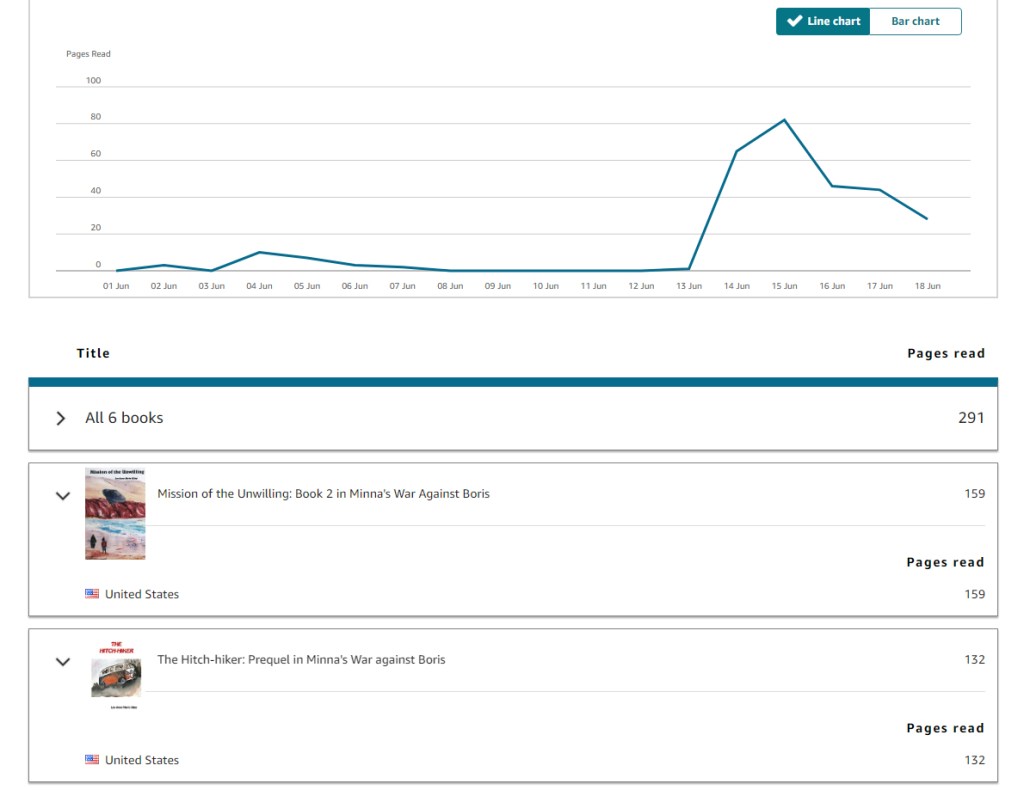
KENP—Kindle Edition Normalized Pages, is a programme exclusive to Amazon. If you opt for this programme you need to be exclusive to Amazon and not use other platforms to sell the kindle-version of your book. In this programme, a reader, who is a Prime member, meaning that they subscribe to Amazon for certain benefits such as Kindle Lending Library, can read any book in the programme for free. The advantage is that the author gets paid for every page the reader reads.

To see how your book is tracking on KENP, you can click on the KENP button on your report page and check out how many pages have been read. The Amazon report page will indicate if any KENP pages have been read.

*[Screen shot 4: KENP pages count]

What I have discovered recently is that as someone reads on KENP, the ranking of the chosen book improves, meaning potentially more readers, more sales.

Main Takeaway

What I hope you have gleaned from this gazing into analytics is that reporting on your sales may look scary. It may look discouraging if there are not many sales. But what I encourage you to do is have a go, click on your chosen platform’s “Reports” or “Analytics”, explore and get familiar with the graphs and information. Regularly check out how your book is faring in sales-world. I mean, a farmer regularly checks the rain gauge, the barometer and soil samples to improve productivity. The same is true of an author. Analytics is a tool. Use it.

© Lee-Anne Marie Kling 2023

Feature photo: Rain gauge © L.M. Kling 2023