Indie Scriptorium — Self Publishing Collective

Helping Each Other Publish

Skip to content
  • Home
  • About Us
  • Blog
  • Books For Sale
  • Introducing Indie Scriptorium
  • Links–More for You
Search

book cover

Publishing Pointers–DIY Book Cover

May 13, 2023 / lmkling / Leave a comment

Cover Design–How to DIY Your Cover

In my last blog, I suggested that getting a professional illustrator or buying a ready-made book cover is the way to go for most writers. Purchasing a cover, you like and fits with your genre, can be easy and time effective and doesn’t cost too much.

If you can work with a graphic designer or illustrator, it will cost more but may be worth the money to get a cover that attracts readers and markets your book. A good illustrator can provide images of your characters and this may be super important if you have imaginary beasts and extra-terrestrials you want to introduce to your readers visually.

I wanted a book cover that used my original artwork and reflected the Regency era as well as the genre. I looked at many websites offering pre-made covers and couldn’t find a template that was anywhere close to what I wanted.

I played in Canva and Microsoft Word and came up with a few ideas but found the process time consuming and sometimes frustrating. I also don’t have the technical skills to get the quality of the image right. To purchase programs like Photoshop is expensive and just wasn’t worth it for a few covers. So, I have now engaged a graphic designer to help me achieve the cover I envisage.

However, if you want to try to do your own cover design and have the time to play, I will provide some basic exercises that will lead you in the right direction.

Working in Microsoft Word

The word program is not an easy option but is doable if you have the time and energy to fiddle. It does often mean that you will disappear down a rabbit hole and emerge much later with a cover design, or not.

Step 1: Open a blank document. (Go to your tool bar and select “File”, then select “Blank Document) Choose custom size that best suits your book size.

[Screen shot 1: Selecting a blank document]

    Step 2: Select “Layout” in your tool bar and put in some margins that reflect the size of the cover you want. I suggest a standard size such as 15cm x 23cm (6 x 9 inches) You can decide on your own margins by clicking the arrow besides the margins diagram and scrolling down to custom margins and then setting the margins to best suit your cover size.

    [Screen shot 2: selecting Layout]

    Step 3: Click your mouse on “Insert” in tool bar and select “Pictures” using the downward arrow. You can select an image from online, stock photos, pictures from a file or from your photos. Please be aware that you must check if the image used is copyrighted. I select photos from Creative Commons. http://creativecommons.org.au/learn/licences/. You can also buy images from places like Shutterstock, Pinterest and many other places. Just Google Photo Images to buy, or similar. It is worth looking up the terms and conditions of Creative Commons licences and how to attribute an image used.
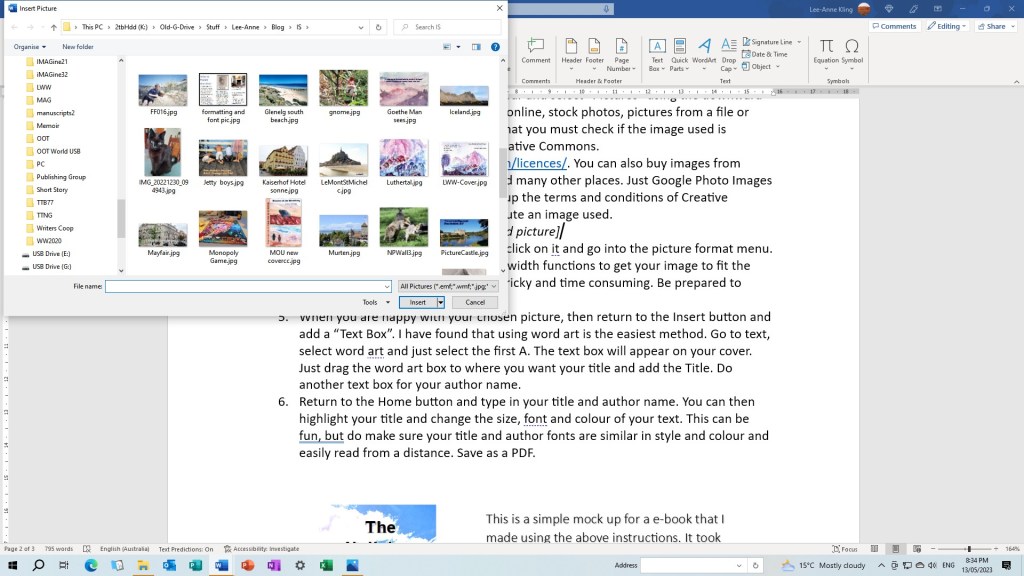
    [Screen shot 3: Inserting your selected picture]

    Step 4: Once you have selected your image, click on it and go into the picture format menu. You can use the crop and height and width functions to get your image to fit the size of your front cover. This can be tricky and time consuming. Be prepared to experiment and learn as you go.

    [Screen shot 4: Formatting your picture]

    Step 5: When you are happy with your chosen picture, then return to the Insert button and add a “Text Box”. I have found that using word art is the easiest method. Go to text, select word art and just select the first A. The text box will appear on your cover. Just drag the word art box to where you want your title and add the Title. Do another text box for your author name.
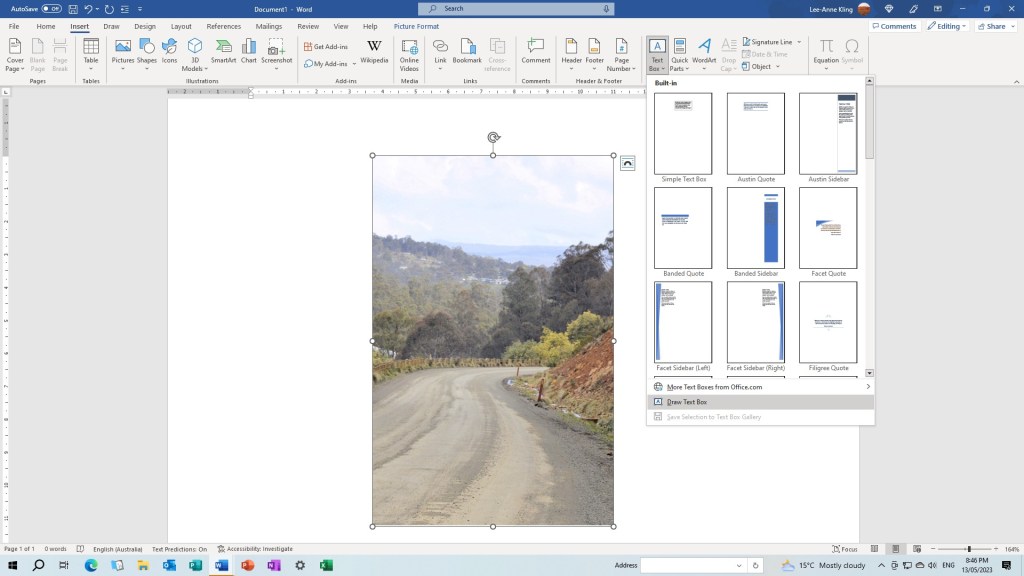
    [Screen shot 5: Text Box]

    Step 6: Return to the Home button and type in your title and author name. You can then highlight your title and change the size, font and colour of your text. This can be fun, but do make sure your title and author fonts are similar in style and colour and easily read from a distance. Save as a PDF.
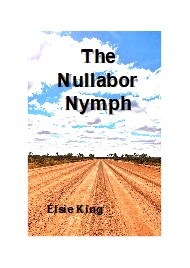
    This is a simple mockup for an e-book that I made using the above instructions. It took several hours to complete. There are a host of videos on You Tube which give more detailed instructions that I would recommend you look at. To complete a paperback cover with a back cover and spine you will need to do further research.

    There are many programs on YouTube that will demonstrate a more sophisticated, and possibly easier ways of designing a book cover. Good luck, I’m going to a professional.

    Elsie King ©2023

    Image: Attribution by Creative Commons.

    Share this:

    • Click to share on X (Opens in new window) X
    • Click to share on Facebook (Opens in new window) Facebook
    Like Loading...

    Publishing Pointers–The Book Cover

    April 22, 2023 / lmkling / 1 Comment

    Think of the book cover as your best marketing tool.

    Imagine a potential reader is browsing the shelves or a table at your local bookseller. They love historical romance and they browse to find their favourite authors. None there, so then they browse for similar books to try out. It is the cover that will attract this reader, so it has to be right.

    The book cover is the full wrap-around. It includes the title, artwork and author’s name. The Spine provides the title and author and the back includes the blurb, the ISBN and publishing details.

    What makes an excellent cover?

    • It should scream out the genre through the use of design photos, images and art.
    • Display the title and author in a striking but easy-to-read font and style.
    • It must be beautiful and use colours that reflect the contents.
    • The design should grab attention, be unique, but also contain elements that are popular in the genre. It pays to do the research.

    Can you make your own cover?

    Most self-publishing groups recommend you hire a professional to design your cover, especially if you are not an artist or a technical wizard using a computer. I suggest you save up some money and pay a professional.

    Finding a designer is a matter of a few easy searches on Google using the keywords, “book cover designs” and there will appear a long list of companies offering to make a wonderful book cover just for you. The prices vary a lot and can be anywhere between $500 and $800 dollars.

    You can also buy book covers that are pre-made. If you add something like “Paranormal Romance book cover” in your Google search, you will find an array of potential designs where you just add your title and the author’s name to a pre-made design.

    Pre-made designs include the front cover, back cover and spine, and each design is unique. Browse the designs and choose one that suits your book, and this may be a simple and cost-effective way for you to cover your book. Remember that you will need your back cover blurb, ISBN, reviews and whatever author information you wish to include. The costs of using a pre-made is cheaper than having your cover made up from scratch. The average price for an e-book and a print edition is between $100 – $300, but there is a lot of variation.

    If you want something unique, contact a graphic designer and/or illustrator. What’s the difference, you ask? A graphic designer uses licensed stock photos and images. An illustrator will create your cover design using your characters and ideas from your book.

    But what if you want to be the designer? You may have a specific design that is not on offer anywhere, or you want to have full artistic control over your book. Perhaps it is a matter of cost. Be warned that designing a book cover for self-publishing requires time to master the elements of book cover designs and technical skills. Not for the faint-hearted, but yes, it is doable. More on this next time.

    Places to look for more information: Reedsy.com>book-cover-art -, Canva for design templates. Elite Authors, Paper and Sage Book Cover design. Explore their websites as they have some interesting and informative articles.

    Cheers: ©Elsie King 2023

    Book cover photo from Creative Commons


    Share this:

    • Click to share on X (Opens in new window) X
    • Click to share on Facebook (Opens in new window) Facebook
    Like Loading...
    Blog at WordPress.com.
    • Subscribe Subscribed
      • Indie Scriptorium -- Self Publishing Collective
      • Join 95 other subscribers
      • Already have a WordPress.com account? Log in now.
      • Indie Scriptorium -- Self Publishing Collective
      • Subscribe Subscribed
      • Sign up
      • Log in
      • Report this content
      • View site in Reader
      • Manage subscriptions
      • Collapse this bar
     

    Loading Comments...
     

      %d